Features

From the first idea to the last memory, every step.

Tools for planning, deciding together, the moments on the road and the memories that stay. All inside the same trip, in one place shared with your companions.

01

Planning

From an idea to a day-by-day itinerary: dates, stops, travel times and weather together.

Day-by-day itinerary

Place stops on days and times; the map and the list show the same plan.

  • Time, duration and a note for each stop; drag stops to another day
  • Walking, driving and transit times between stops
  • 2D and 3D maps
  • Add the itinerary to your calendar (.ics)
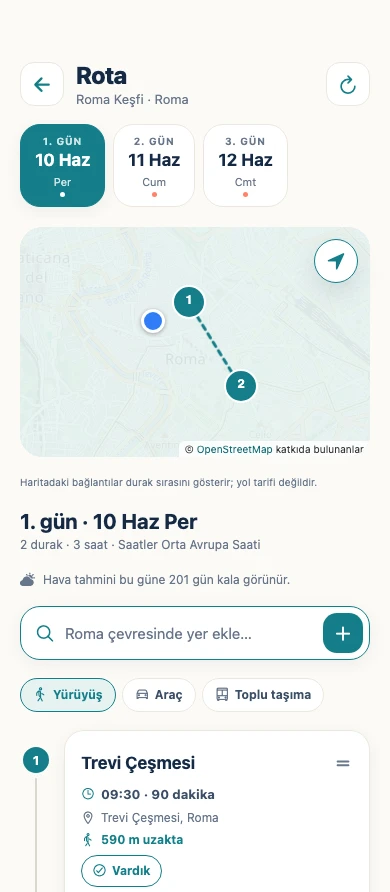
Wentby itinerary: days of a Rome trip, the map and the Trevi Fountain stop

Trip wizard

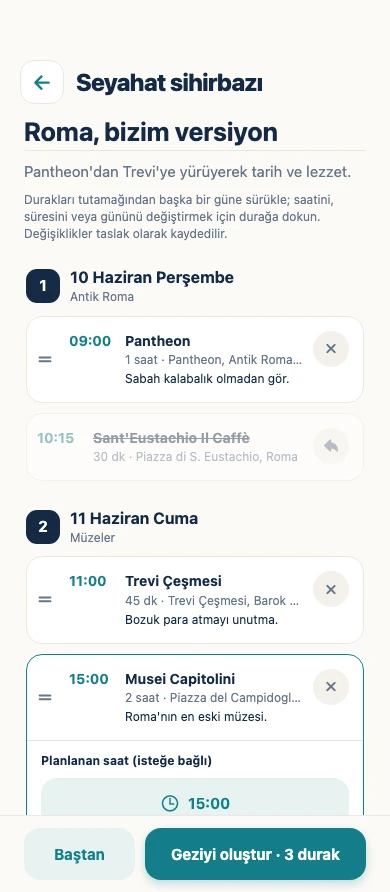
Pick the place, dates, your interests and pace; the wizard drafts a day-by-day plan of real places and suggests hotels nearby.

  • Edit the draft by dragging, drop the stops you don’t want
  • The trip is created only when you approve it
  • Half-filled forms and drafts are never lost
  • Your name, email and companions are never sent to the AI provider
Wentby trip wizard: a day-by-day draft itinerary for Rome

Weather in the itinerary

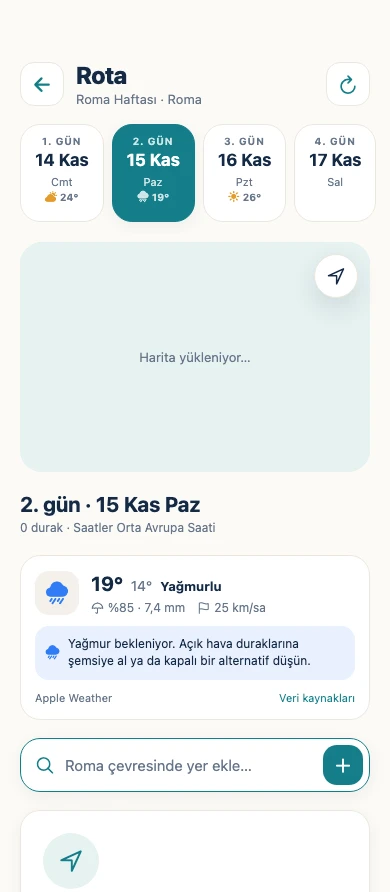
The day’s temperature, chance of rain and wind, right above the itinerary.

  • A reminder to plan an indoor alternative on rainy days
  • Apple Weather, with Open-Meteo as a fallback
  • Days beyond the forecast tell you when the forecast will appear
Wentby weather in the itinerary: a rain warning for the day

02

Deciding together

Tools that close the gap between the group chat and the plan.

Trip chat and notifications

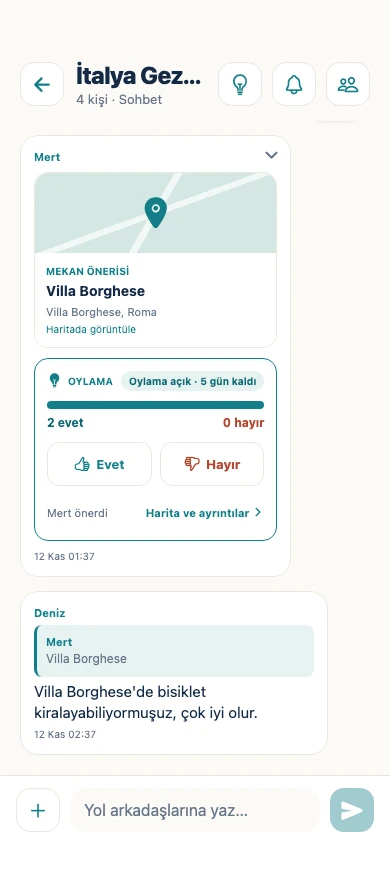
Every trip has its own chat: messages, place cards, replies and reactions reach everyone instantly, and new messages arrive as notifications on your phone and in the browser.

  • Share places and view them on the map
  • Reply, edit and react to messages
  • Mute a chat; notifications never show message content
  • Report messages or members, and block people
Wentby trip chat: messages from companions and a suggested place, Villa Borghese

Proposals and voting

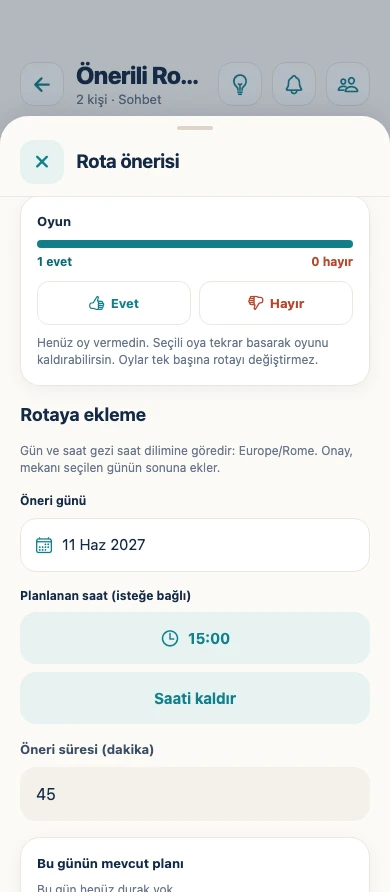
Suggest a place from the chat; the group votes and someone with permission approves it with a day and time.

  • One vote per person; you can change your mind
  • Votes never change the plan by themselves
  • Decisions and who approved them are recorded
Wentby itinerary proposal: open vote and approval for Piazza Navona

Invites and roles

Trips start private and people join by invitation. Owner, admin, member and viewer roles decide who can change what.

  • Owners and admins edit the itinerary and approve proposals
  • Viewers see the plan without changing it
  • Ownership can be transferred

03

On the road

Once the trip begins, everything you need is a tap away.

Today card

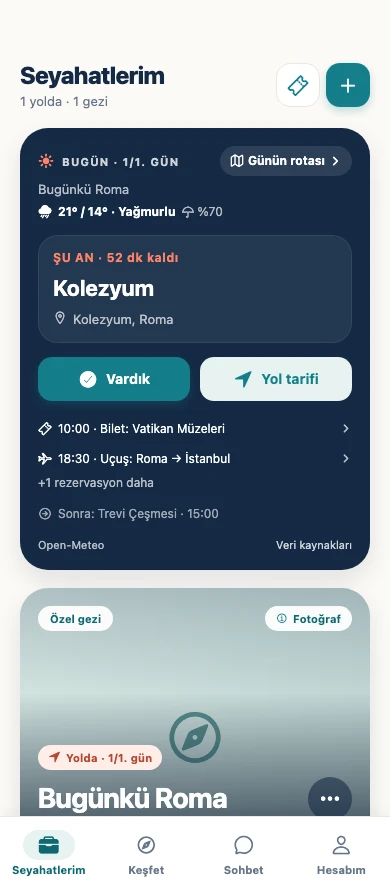
The next stop, time remaining, the day’s tickets and the weather in one card.

  • Mark your arrival in one tap
  • Open directions straight away
Wentby Today screen: next stop Colosseum, time remaining, Arrived and Directions buttons

Discover and narration

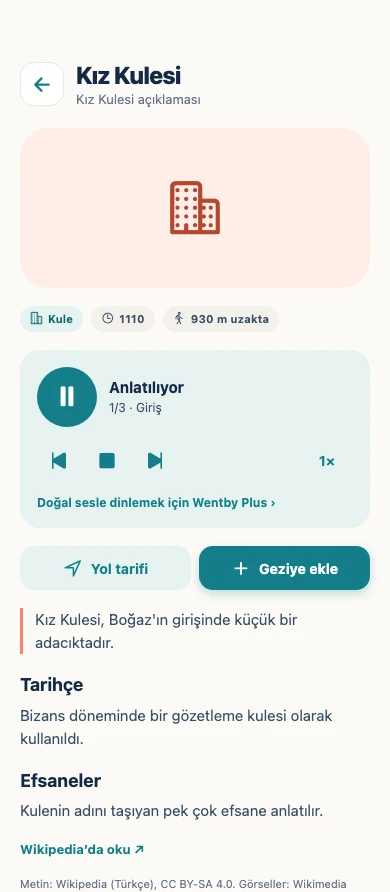
See the historic buildings around you on a map, read or listen to their stories, and add the ones you like to your itinerary.

  • Mosques, towers, fountains, palaces, castles, ancient cities
  • Free narration in your device’s voice; natural voices with Plus
  • From Wikipedia and Wikimedia, with source and licence always shown
  • Works without a trip, too
Take a closer look at Discover →
Wentby Discover: narration and history of the Maiden’s Tower

Offline use

The phone app automatically saves the trip you open and up to five active or upcoming trips to your device — there’s no download button.

  • Read the itinerary, budget, recent messages and memories offline
  • New messages and expenses wait in a queue and send when you’re back online
  • The phone app opens offline for up to 30 days

Booking wallet

Flights, stays, tickets and insurance: the booking code in large type, the file right next to it.

  • PDF, JPEG and PNG documents
  • Keep files on the device for offline use
  • Documents are visible only to you by default
Wentby booking wallet: an Istanbul–Rome flight and its booking code

04

Shared tasks

Who paid for what, who brings what: keep money and preparation transparent.

Budget and expense splitting

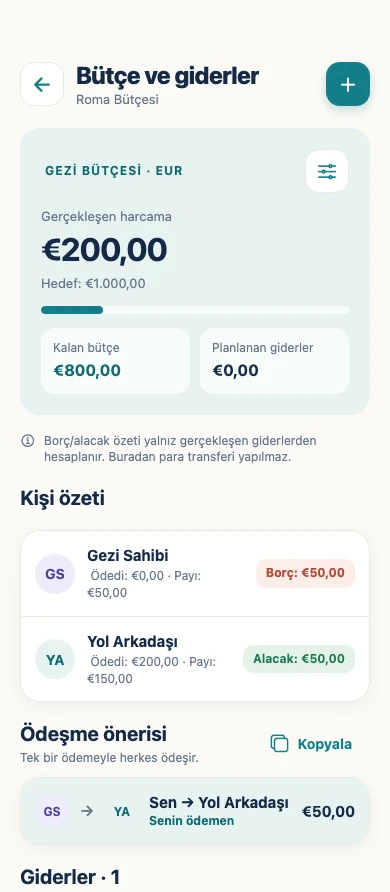
A target budget, actual and planned expenses, and who owes whom.

  • Split equally or by custom amounts, down to the cent
  • 13 currencies; foreign expenses are converted at the ECB reference rate
  • A settle-up suggestion with the fewest payments
  • No money changes hands in the app — it only keeps the accounts
Wentby budget: actual spending, remaining budget and balances per person

Shared checklists

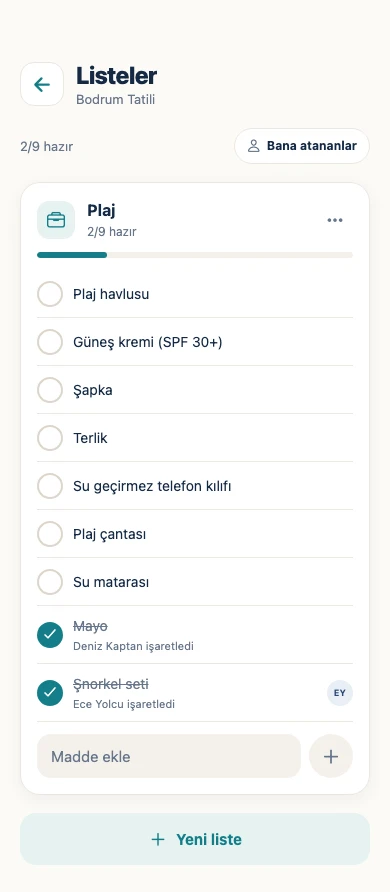
Packing, documents, to-dos, shopping: assign items to people and see checks appear for everyone instantly.

  • Templates for packing, travel documents, beach, winter and family trips
  • An “Assigned to me” filter
Wentby shared checklist: a beach list with checked items

05

Memories

The most valuable thing a trip leaves behind: memories made together.

Shared photo album

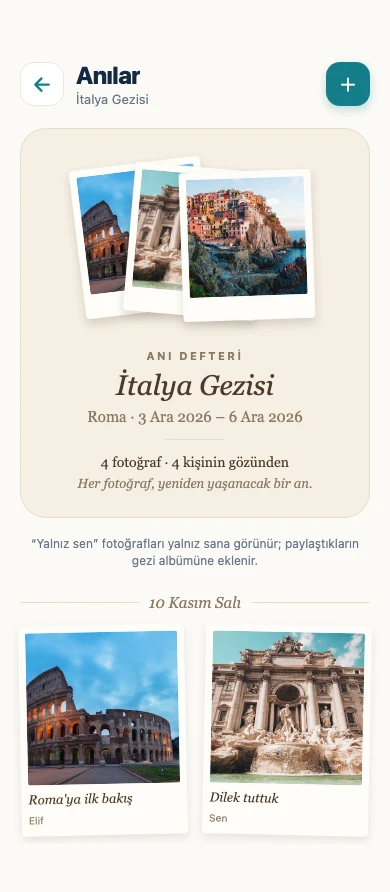
The trip’s photos in one album with notes and stop links; each photo open to you alone or to the whole group.

  • Photos are compressed and kept in private storage
  • Save photos to your gallery
  • 200 photos on the free plan, 5,000 with Plus
Wentby Memories: the memory book and photos of an Italy trip

PDF trip guide Plus

Turn your itinerary, stops and notes into a trip guide you can print and share.

  • A Wentby Plus feature
  • Every member can get it with their own Plus

Wentby Plus

Planning together is free; Plus is only for extras.

Plus is personal: a trip owner’s Plus doesn’t pass to other members. When Plus ends your photos are never deleted; you just can’t upload new ones until you’re under the free quota.

Plus purchases are not open yet during the beta; pricing will be announced when they are.

FeatureFreePlus
Trips, invites, itinerary, chat, votingUnlimitedUnlimited
Budget, wallet, checklistsIncludedIncluded
Discover with device-voice narrationIncludedIncluded
Natural-voice narration—Included
Photo storage (per person)200 photos5,000 photos
PDF trip guide—Included

Beta is open

Plan your next trip with Wentby.

Anyone can start on the web today and add it to the home screen like an app. Apply for the closed beta of the iPhone and Android apps and your invite will arrive by email.