Open beta on the web · Closed beta on iOS and Android
Plan the trip together, discover more, keep it all.
Wentby is the travel app where you build the itinerary day by day with your companions, listen to the history of the places you visit, and gather every memory of the trip in one shared album.
Free to plan togetherTrips, invites, itinerary, chat and budget are unlimited on every plan.
Nothing to installStart on the web, add it to your home screen and use it like an app.
Private by defaultEvery trip is visible only to the people you invite.
English and TurkishInterface, narration and notifications in both languages.
Four moments of a trip
Plan, decide, go and remember — all in one trip.
Instead of links lost in group chats, budgets in separate spreadsheets and photos scattered across phones: one shared trip.
01 Plan
Build the itinerary together, day by day
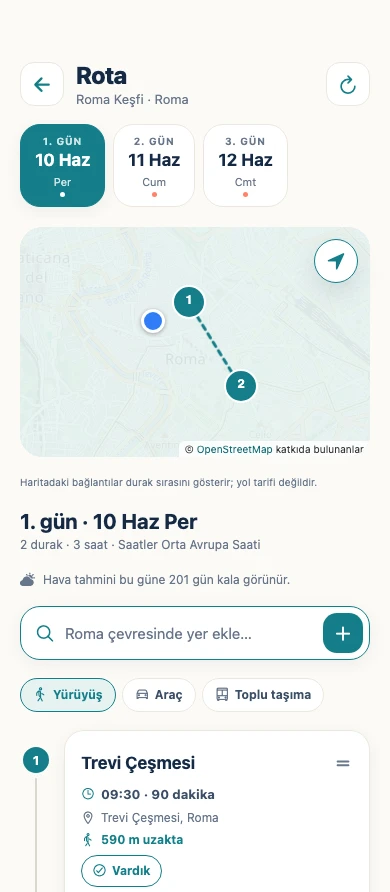
Gather the dates and stops of your trip in one place. Stops are ordered by time and shown on the map; walking, driving and transit times tell you how long it takes to reach the next one.
A draft itinerary of real places from the trip wizard
Weather for each day of the itinerary
Add the itinerary to your calendar in one tap
9:41
02 Decide
Ideas from the chat don’t get lost
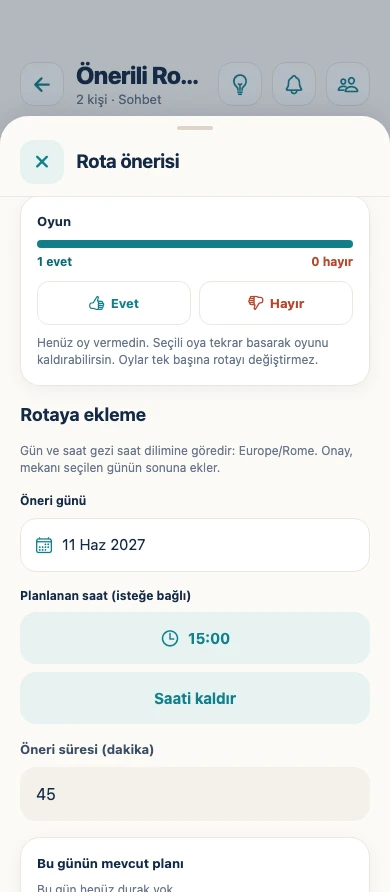
Share a place in the trip’s own chat and suggest it for the itinerary in one tap. Your companions vote; the trip owner or an admin approves it by picking a day and time. A majority never changes the plan on its own — every decision is someone’s explicit approval.
Seven-day voting
Role-based permissions
New message notifications
9:41
03 Go
Everything that’s next, right in front of you
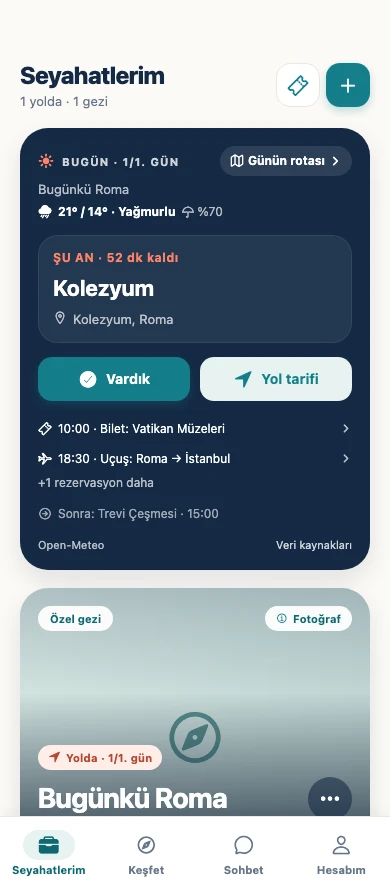
The Today card shows your next stop, how long until you get there and the day’s bookings. Mark that you’ve arrived, open directions. Trips are saved to your phone automatically, so the itinerary, messages and documents stay with you even without a connection.
Next stop and time remaining
Automatic offline saving
Historic places nearby
9:41
04 Remember
When the trip ends, the memories are in one album
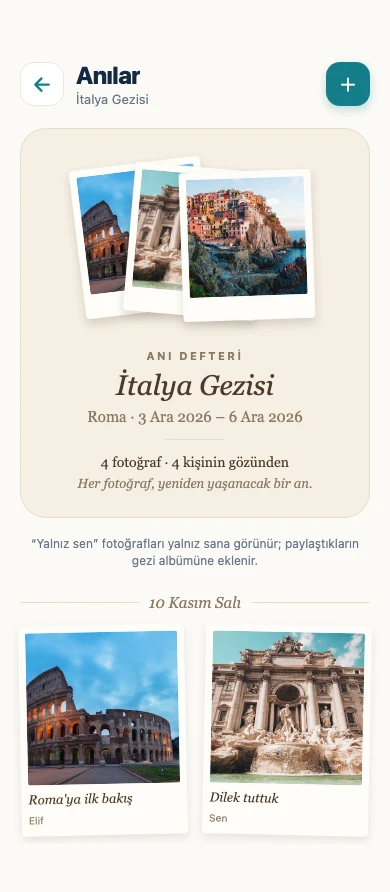
Everyone’s photos live in the trip’s shared album, with notes and links to the stops where they were taken. You decide what to share: each photo is visible to you alone or to the whole group.
Private or shared, photo by photo
Memories linked to stops
A PDF trip guide with Plus
9:41
Discover
A tour guide in your pocket.
See the mosques, towers, fountains and ancient cities around you on a map. Read each place’s story or listen to it as you walk, and add the ones you like to your itinerary in one tap.
Drag to rotate · zoom
Ancient siteAD 70–80Rome, Italy
Colosseum
This vast amphitheatre in the heart of Rome was begun under Emperor Vespasian and opened under his son Titus in AD 80.
ListenDevice voice · natural voice with Plus
History
Built as the Flavian Amphitheatre, it hosted tens of thousands of spectators for gladiator fights and public spectacles. Crowds entered through numbered arches and could reach their seats within minutes.
What you see today
The southern side of the outer ring was lost to earthquakes and stone robbing, which is why the inner arcades are visible from outside. Beneath the arena, the hypogeum corridors where animals and scenery waited lie exposed.
Tower1348Istanbul, Türkiye
Galata Tower
Built by the Genoese as the highest point of the Galata walls, the tower has risen above the Golden Horn and the Bosphorus for centuries.
ListenDevice voice · natural voice with Plus
History
The Genoese called it the “Tower of Christ”. In Ottoman times it served as a watchtower and fire lookout, and its roof and upper floors were rebuilt several times.
What you see today
From its arcaded gallery you can see the historic peninsula, the Golden Horn and the Bosphorus at once. Its conical cap is one of the most familiar lines on Istanbul’s skyline.
Ancient sitec. AD 117Ephesus, İzmir
Library of Celsus
Built by Gaius Julius Aquila in memory of his father, Tiberius Julius Celsus Polemaeanus, the library is the most photographed façade in Ephesus.
ListenDevice voice · natural voice with Plus
History
The library held thousands of scrolls, and Celsus himself is buried beneath it. Niches in the façade hold four statues representing wisdom, virtue, thought and knowledge.
What you see today
The two-storey façade you see today was re-erected in the 1970s from pieces found among the ruins. The offset between the column pairs of the lower and upper storeys makes the façade look wider than it is.
In the app, every story comes from Wikipedia and images from Wikimedia Commons, with source and licence always shown. The models are illustrative drawings by Wentby.
Wentby is not a social network. No ads feed, no messages from strangers, no background location tracking.
Trips start private
Only the people you invite can join. No social feed, no messages from strangers.
No location tracking
Location is used only while the app is open and only when you ask. Nothing is tracked in the background.
Nothing on the lock screen
Notifications only say “You have a new trip message.” — never the message, sender or trip name.
Your data, your call
Download your personal data or delete your account at any time.
Wentby Plus
Planning together is always free.
Plus only unlocks what costs more to run or adds extra value: natural-voice narration, more photo storage and a printable PDF trip guide. The trip’s shared tools are never limited on any plan.
Plus purchases are not open yet during the beta; pricing will be announced when they are.
Discover with device-voice narrationIncludedIncluded
Natural-voice narration—Included
Photo storage (per person)200 photos5,000 photos
PDF trip guide—Included
FAQ
Questions you might have
What is Wentby?
Wentby is a travel app for people travelling solo, as a couple or as a group to keep a trip’s plan, decisions and memories in one place. The itinerary, chat, voting, budget, documents, checklists and photo album all live inside the same trip.
Does Wentby cost anything?
Planning together is never limited: creating trips, invites, the itinerary, chat, voting, budget, wallet, checklists and Discover are free. Wentby Plus unlocks natural-voice narration and the PDF trip guide, and raises photo storage from 200 to 5,000 per person. Plus purchases are not open yet during the beta.
How do I join the beta?
The web version is open to everyone: create an account at app.wentby.net and start right away. The iPhone and Android apps are in closed beta; apply through the beta page and a TestFlight (iPhone) or Google Play closed-testing (Android) invite will arrive by email.
Can I install Wentby on my phone like an app?
Yes. The web version is a PWA: open app.wentby.net in your phone’s browser and choose “Add to Home Screen” — Wentby opens full screen with its own icon and can receive notifications. Once you join the mobile beta you can use the iPhone and Android apps as well.
Which devices and languages are supported?
Wentby runs on iPhone, Android phones and in the browser, and the same account shows the same trips everywhere. The interface is available in English and Turkish; you can change your account’s language in settings.
Can I use it when travelling alone?
Yes. Solo trips need no invites or voting; the itinerary, Discover, wallet, checklists and album work just the same. You can invite companions whenever you like.
Anyone can start on the web today and add it to the home screen like an app. Apply for the closed beta of the iPhone and Android apps and your invite will arrive by email.